Before you can export and import Revit data to or from EasyPower, you must install the EasyPower Revit Integrator add-in to the Revit program. The steps to do this are described below.
Note: EasyPower 2026 is compatibile with Revit 2023 through 2026. An EasyPower Revit Integrator license is required to exchange data with Revit.
- Close Revit if it is open.
- Download the EasyPower Revit Integrator app from the Autodesk App Store.
- Double-click on the downloaded file to start the installation process.
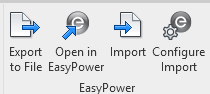
- Start Revit and confirm that the EasyPower Revit Integrator add-in is now displayed on the Add-ins tab.
Note: Alternatively, you can install the Revit add-in as part of the EasyPower installation. See Performing the Installation for more information.
Note: If you later need to uninstall the add-in, you can do so from the Windows Control Panel.