Open a File
To open a file that has already been created, do any of the following:
- Haga clic en
 Abra desde la Barra de Herramientas de Acceso Rápido.
- If the Start Page is open, click Open One-line.
- If the Start Page is closed, click File > Open File.
Si esto muestra un cuadro de diálogo Abra donde su puede buscar a través de las unidades y directorios para encontrar el archivo que desea. Abra el archivo haciendo doble clic en él o seleccionándolo y después haciendo clic en Abra.
Sugerencia: You can also drag a .DEZ file from Windows Explorer into the EasyPower session window top open the file.
Si está trabajando en una red y alguien ya abrió el archivo que desea utilizar, o las propiedades del archivo están establecidas como "sólo lectura", se puede ver el archivo, pero no puede guardar cambios al mismo. Puede utilizar Archivo > Guardar Como para guardar el archivo con otro nombre o en una ubicación diferente.
Close a File
To close a file, do any of the following:
-
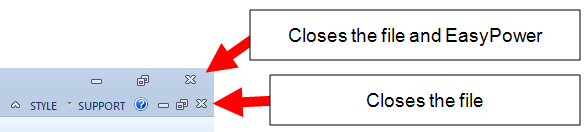
Click the upper Close button in the upper right-hand corner to close the file and the EasyPower program.
-
With the one-line window active, click the lower Close button in the upper right-hand corner. This closes the .DEZ file, but leaves EasyPower open.
- With the one-line window active, click File > Close.
- Click File > Close > Close File.
- Click File > Exit. This closes the .DEZ file and EasyPower.
Nota: If you have made changes to the file that have not been saved, you will be asked if you want to save the file before closing.