The load calculation results can be found in reports and in various places in the program.
Equipment Dialog Boxes
The Summary tab of panel and MCC data dialog boxes display the load calculation results. In the Bus Data dialog box, the tab for Switchgear, Switchboard, or Panelboard displays the results.
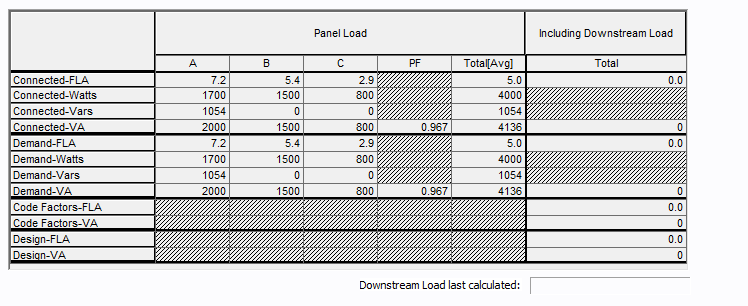
Figura 1: Summary Tab of a Panel or MCC
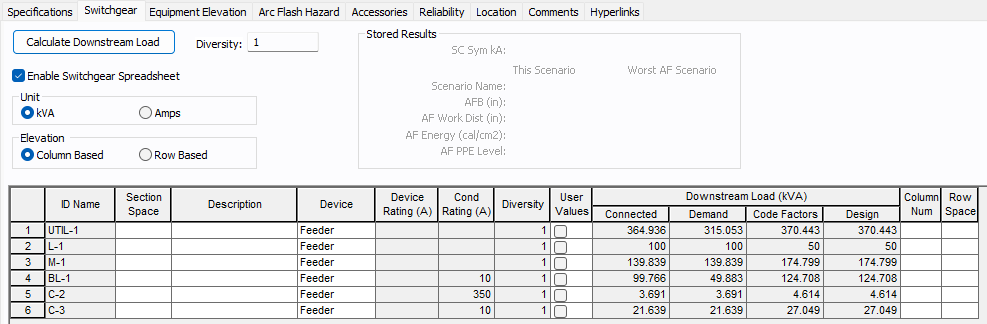
Figura 2: Switchgear Tab of a Bus
Diseño Automatizado
The Auto Design feature uses the load calculations to size various types of equipment. The feature shows the calculated load amps for each item being sized.
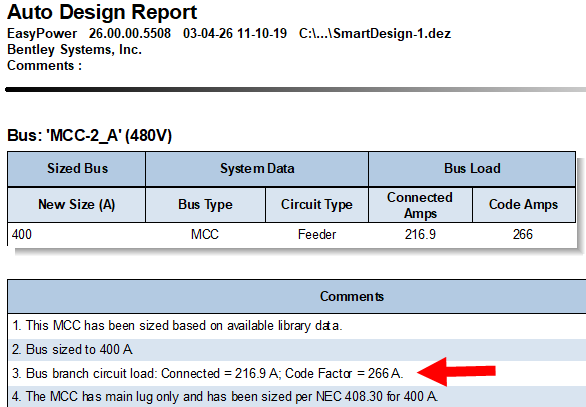
Figura 3: Auto Design Report Shows Connected and Code Factor Loads for an MCC
Listados de Panel
Panel schedules display the summary of the load calculations. You can also create schedules for buses (switchgear, switchboard, panelboard) and MCC.
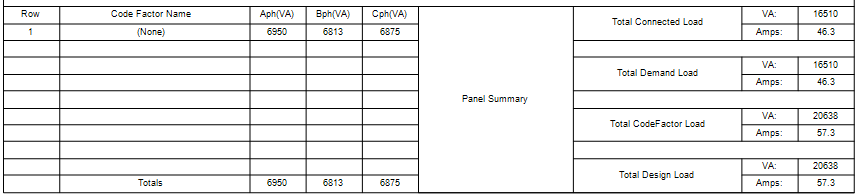
Figura 4: Panel Schedule Shows Connected, Demand, Code Factor, and Design Loads
Navegador de Base de datos
For buses, panels and MCCs, the total loads can be shown in the database browser. Use the (All Data) configuration to identify these columns. You can also create custom configurations to display only the load data that you want to see.

Figura 5: Select the (All Data) Configuration to Display Load Totals in the Database Browser

Figura 6: Load Totals in the Database Browser